RBAC in Unravel for Snowflake
Overview
Role-based access control (RBAC) manages who can see and do what in Unravel. It works with authentication—such as single sign-on (SSO)—to protect your data and the Unravel interface. Authentication answers "Who are you?" RBAC answers "What are you allowed to do?" When combined, they ensure secure and controlled access across your organization.
Single sign-on and RBAC
Single sign-on (SSO) lets users sign in once and securely access multiple applications without reentering credentials. One login provides access to many systems.
SSO uses a central identity provider such as Okta, Azure AD, AWS IAM, or LDAP to:
Authenticate users
Enforce password policies and multifactor authentication
Manage account lifecycle
Eliminate local passwords in individual apps
RBAC then controls what authenticated users can do. In this model, users don't get permissions directly. Instead, permissions flow through roles.
How RBAC works in Unravel
Unravel implements RBAC using OpenSearch security. The process is:
User signs in through an identity provider (SSO, LDAP, IAM, or internal user)
OpenSearch maps the user to backend roles
Backend roles connect to OpenSearch roles with specific permissions
OpenSearch enforces those permissions for all indices, dashboards, and APIs.
RBAC in Unravel works at two levels:
This two-layer approach ensures security both in the data and in the user experience.
Data-level access controls which OpenSearch indices and documents users can reach
GUI component-level access controls which pages and menus appear in the interface
Data-level access
Data-level access defines which data a user can see in Unravel. You configure this by creating roles with index permissions and document-level security (DLS).
Index permissions
When you create a role, you specify:
Index names or patterns (the OpenSearch indices the role can access)
Index permissions (such as read, write, or search)
Optional DLS queries (to filter access to specific documents)
DLS queries filter documents so users see only the data meant for them. DLS uses OpenSearch query syntax. For more details on OpenSearch documentation, see here.
For example, this DLS restricts a role to a single account:
{
 "bool": {
 "must": {
 "term": {
 "acct_id": "SECURE_SHARE_BC"
   }
  }
 }
}
Users with this role see only documents where acct_id matches SECURE_SHARE_BC.
You can combine conditions to filter by multiple fields. This DLS restricts access to a specific warehouse within a specific account:
{
 "bool": {
 "must":
 [
  {
   "term": {
   "compute_name": "COMPUTE_WH"
  }
 },
{
  "term": {
  "acct_id": "SECURE_SHARE_BC"
    }
   }
  ]
 }
}
Now users see data only for that warehouse in that account.
GUI component-level access
GUI component access controls which pages and menus users see in the Unravel interface. All menu items are stored in the sdm_menu_t1-snapshot index in OpenSearch.
Each menu item has fields like:
Admin users see all menus by default. For non-admin users, you create a role with DLS on sdm_menu_t1-snapshot to expose only specific menu items.
For example, this DLS grants access only to query-related pages:
{
 "bool": {
 "should":
 [
  {
   "match": {
   "object_id": "102"
  }
 },
{
 "match": {
 "object_id": "101_01"
    }
   },
  {
   "match": {
   "object_id": "101_02"
    }
   }
  ]
 }
}
When assigned to a user, this role shows only the Query page and related menu items like Query list and Query details.
object_id - a unique identifier
object_name - the display name (for example, "Queries")
action_url - the page path (for example, "/query")
component_name - the UI component type
Core RBAC components
Unravel RBAC relies on three main building blocks:
Users - Authenticated by SSO, LDAP, IAM, or as internal Unravel users. Users don't receive permissions directly.
Roles - Define what users can access. Roles specify index permissions, document-level security, and GUI components.
Role mappings - Connect users to roles. Mappings are managed in the Unravel interface.
Scenarios: RBAC in action
Scenario 1: Full administrator
An operations engineer needs complete control of Unravel for a Snowflake environment. The admin assigns the unravel_admin, an admin role.
With this role, the user can:
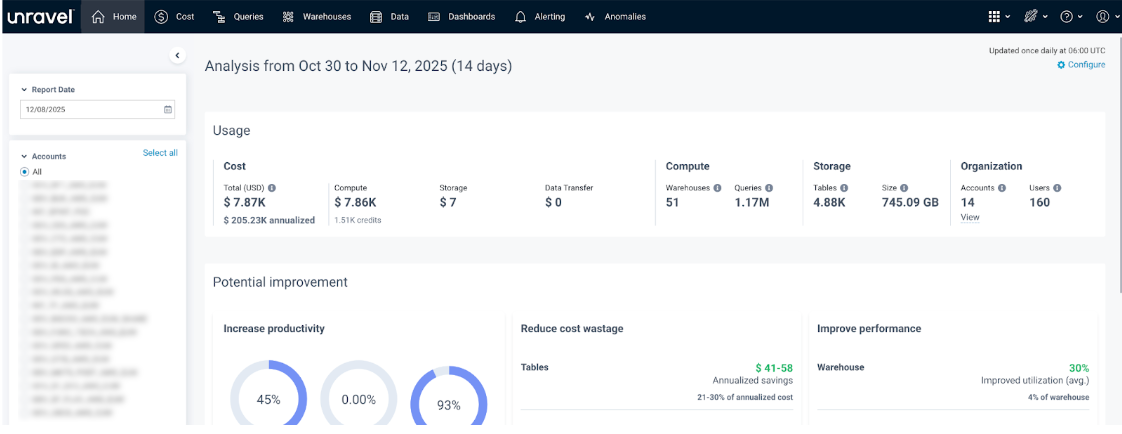
View all pages: Home, Cost, Queries, Warehouses, Data, Dashboard, Alerting, Anomalies, App Store, Manager, Help, and User
Create and manage users, roles, and mappings
Configure all system settings
Scenario 2: Read-only account observer
A compliance manager needs broad visibility into account data but must not make changes. Let us assume the admin creates and assigns a role called ROLE_ACCTID_DEV_EDP_AWS_EUW. The admin can configure the permissions for the role where the user can:
This supports audits and reporting while protecting configuration integrity.
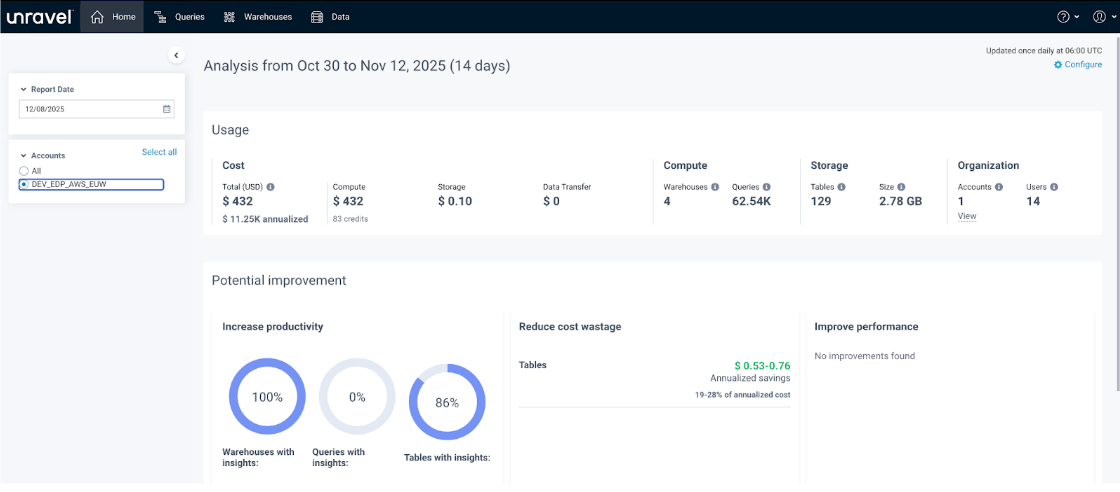
View Queries, Warehouses, Data, Dashboard, Alerting, Anomalies, Help, and User pages
See account-level data
Cannot write, delete, or make admin changes
Scenario 3: Application developer with limited scope
An application developer needs access only to their own queries and must not see other teams’ workloads or account-wide data. Let us assume the admin creates and assigns a role called appdev. The admin can configure the permissions for the role where the user can:
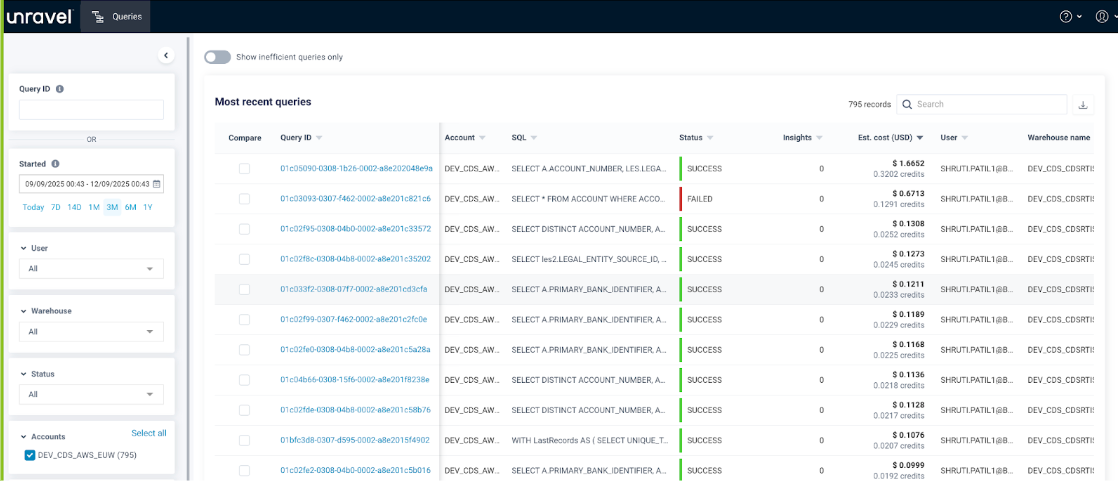
View only the Queries page
See only the queries they have executed and, optionally, queries from users in the same group
Not see other teams’ queries, warehouses, or account-level data
Not see other menus such as Cost, Warehouses, Dashboard, or Manager