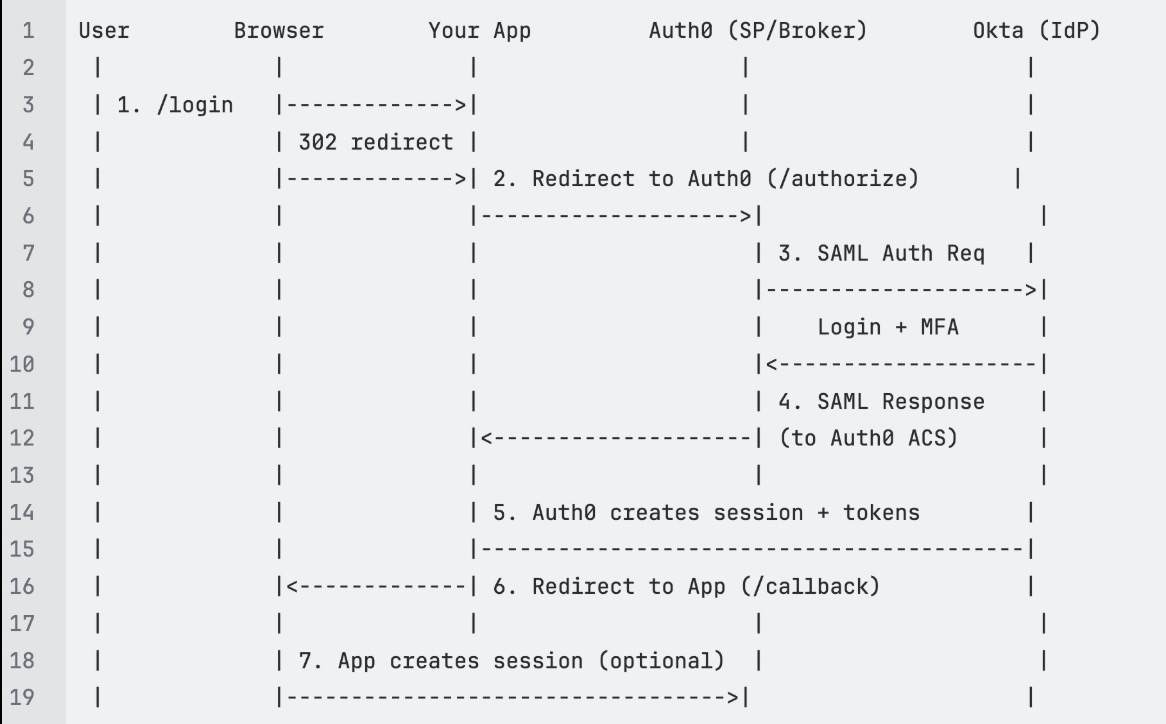
Configure Okta login integration using Auth0
Configure and test SAML-based single sign-on (SSO) using Okta through an Auth0 developer account. This guide helps you integrate SSO with your application.
Prerequisites
Before you begin, make sure you have the following:
An active Auth0 developer account.
Access to the Okta Admin Console.
An application backend that can handle SAML responses, such as a /saml/consume endpoint.
An application running on a valid callback URL, such as http://18.235.125.178:3000/saml/consume.
Step 1: Create an application in Auth0
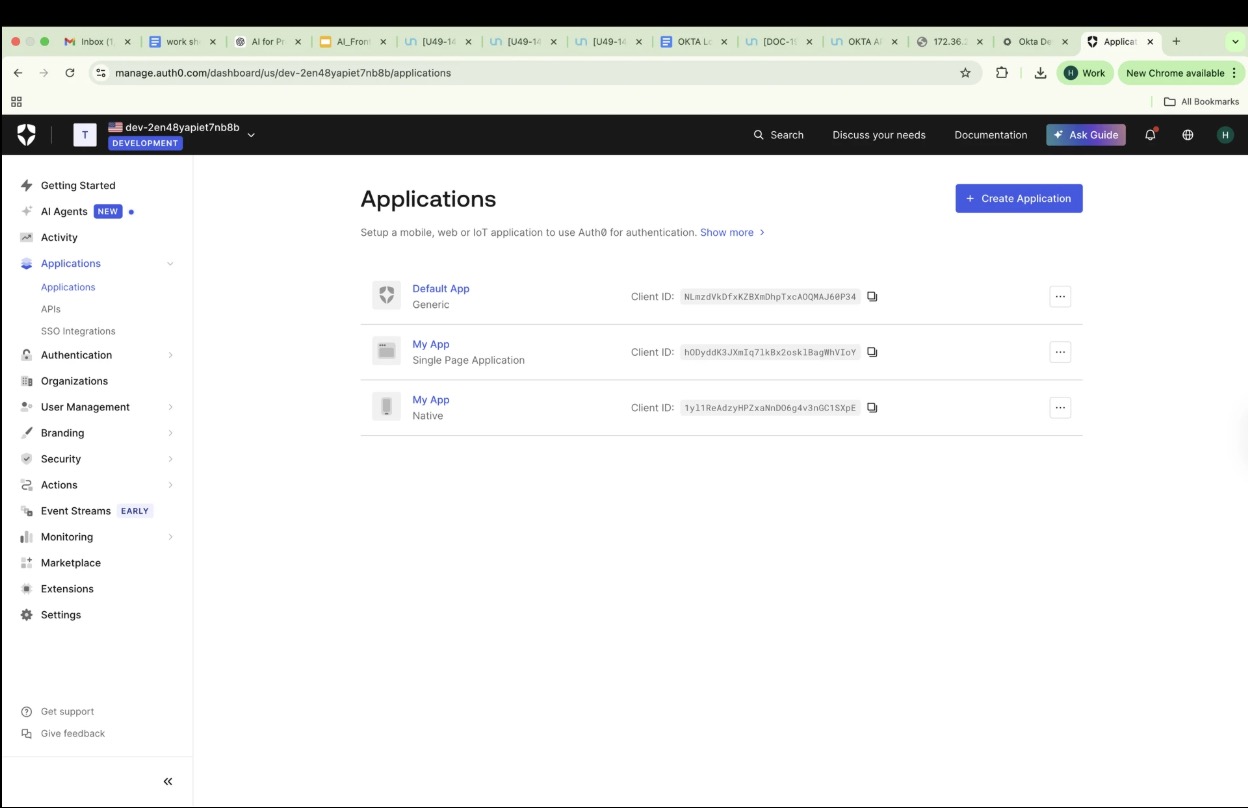
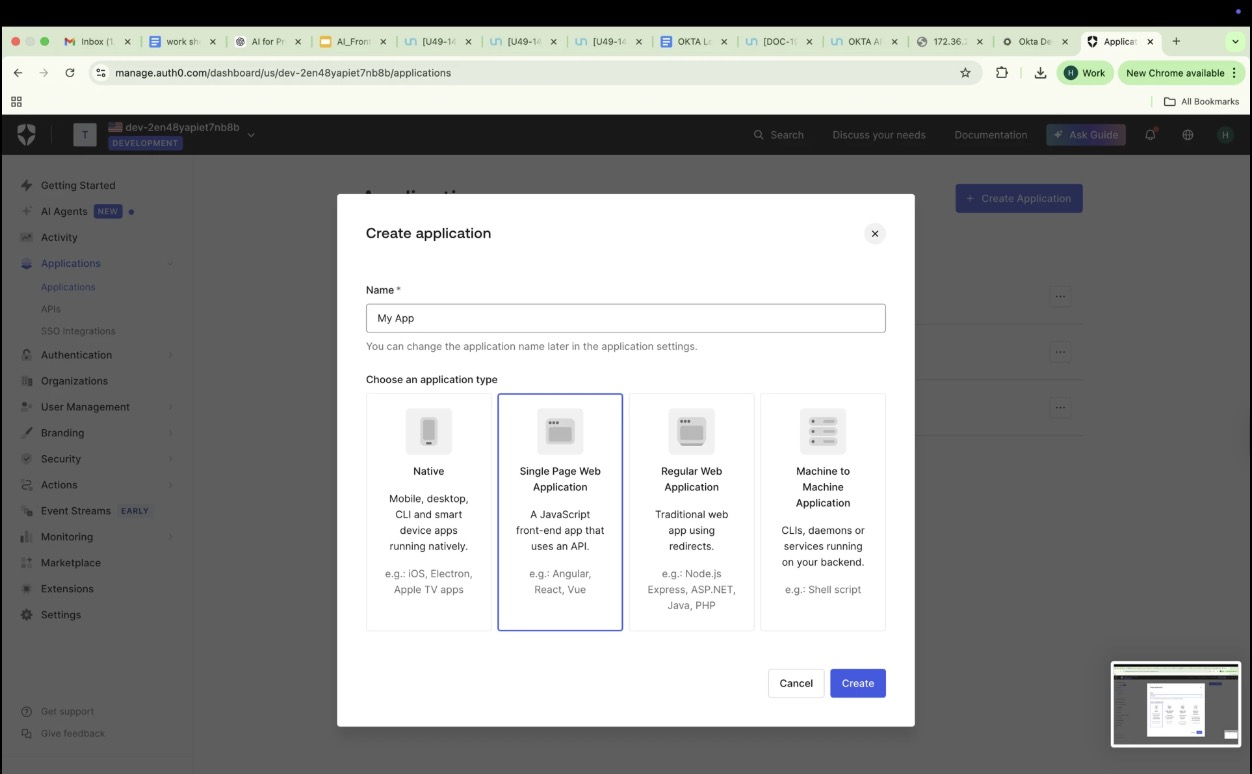
In the Auth0 Dashboard, go to Applications > Applications > Create Application.
Enter a name, such as My App.
Choose Single Page Web Application.
Select Create.
Step 2: Configure basic application settings
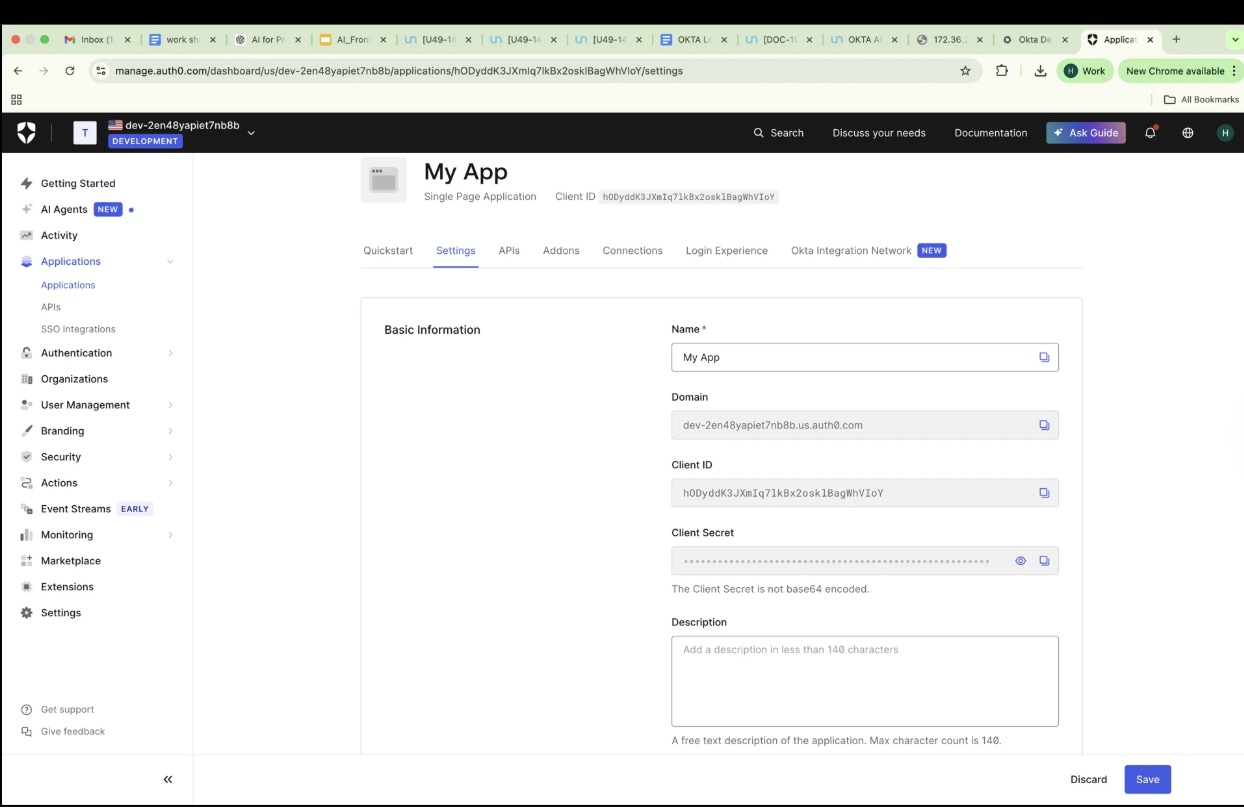
Select the Settings tab for your new app.
Note the Domain, Client ID, and Client Secret. You will need these for integration later.
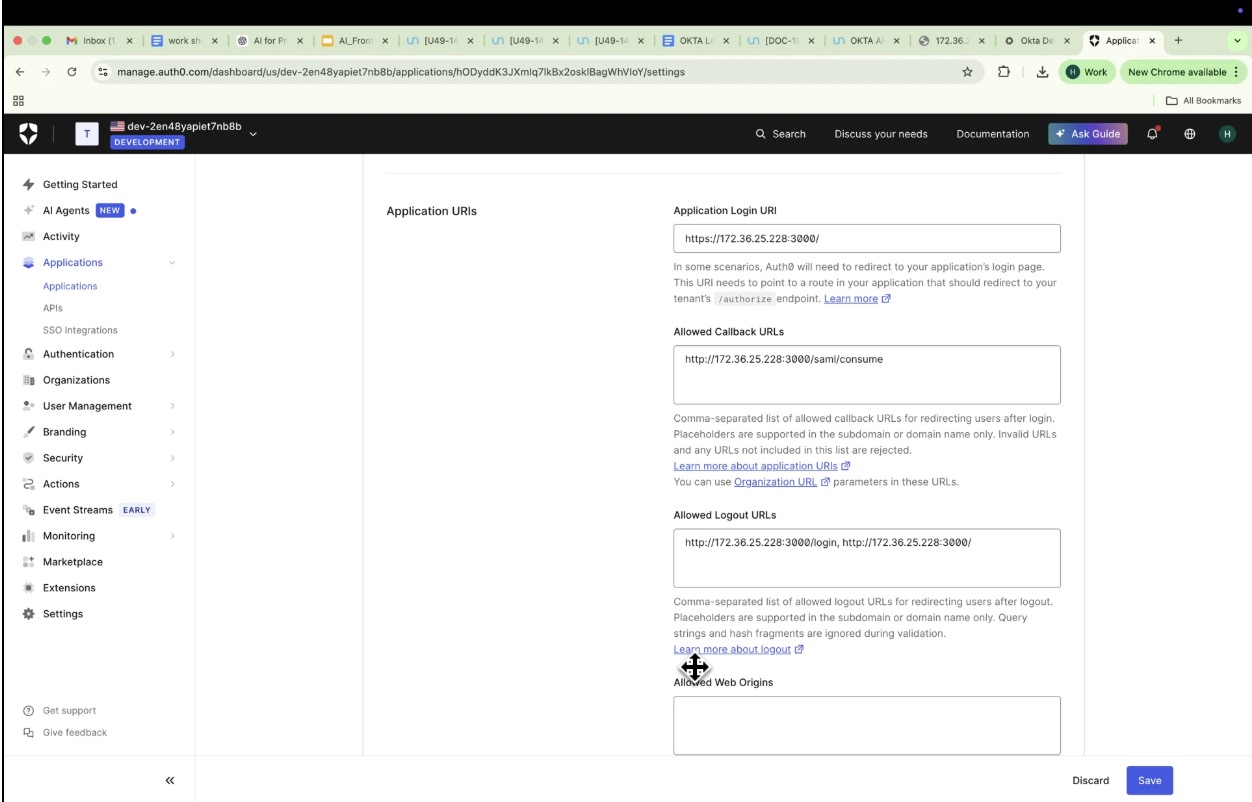
Update the following fields:
Allowed Callback URLs: Enter your application's SAML consume endpoint, such as http://18.235.125.178:3000/saml/consume.
Allowed Logout URLs: Enter your logout redirect endpoint.
Application Login URI: Include your frontend origin.
Select Save Changes.
Step 3: Enable the SAML2 add-on
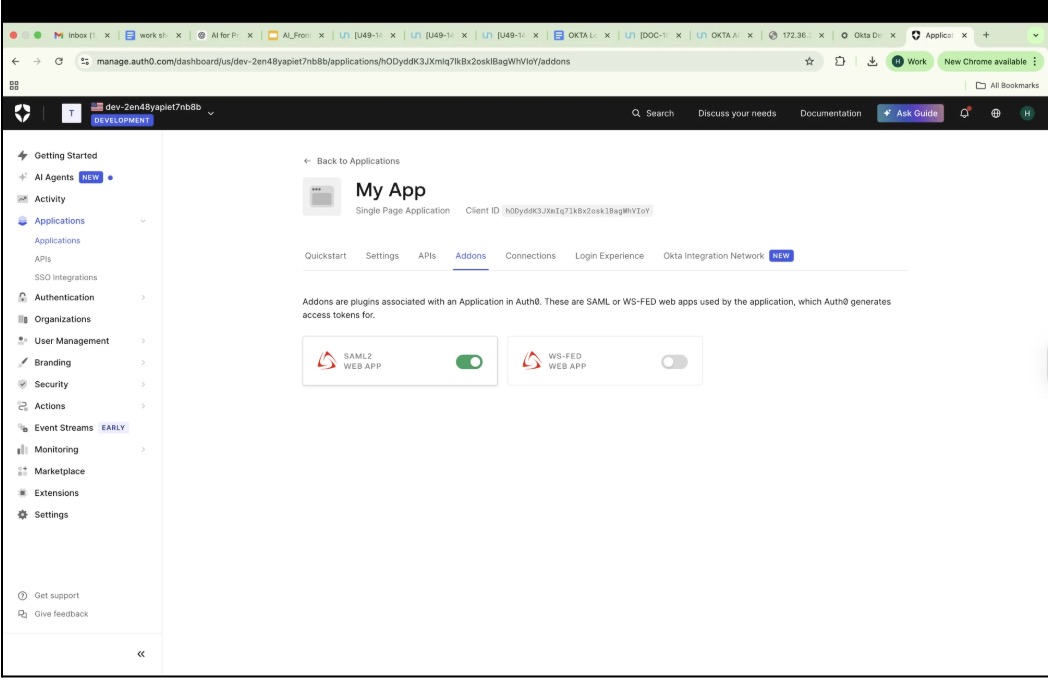
In your application, open the Addons tab.
Turn on the SAML2 Web App toggle.
Step 4: Configure SAML settings
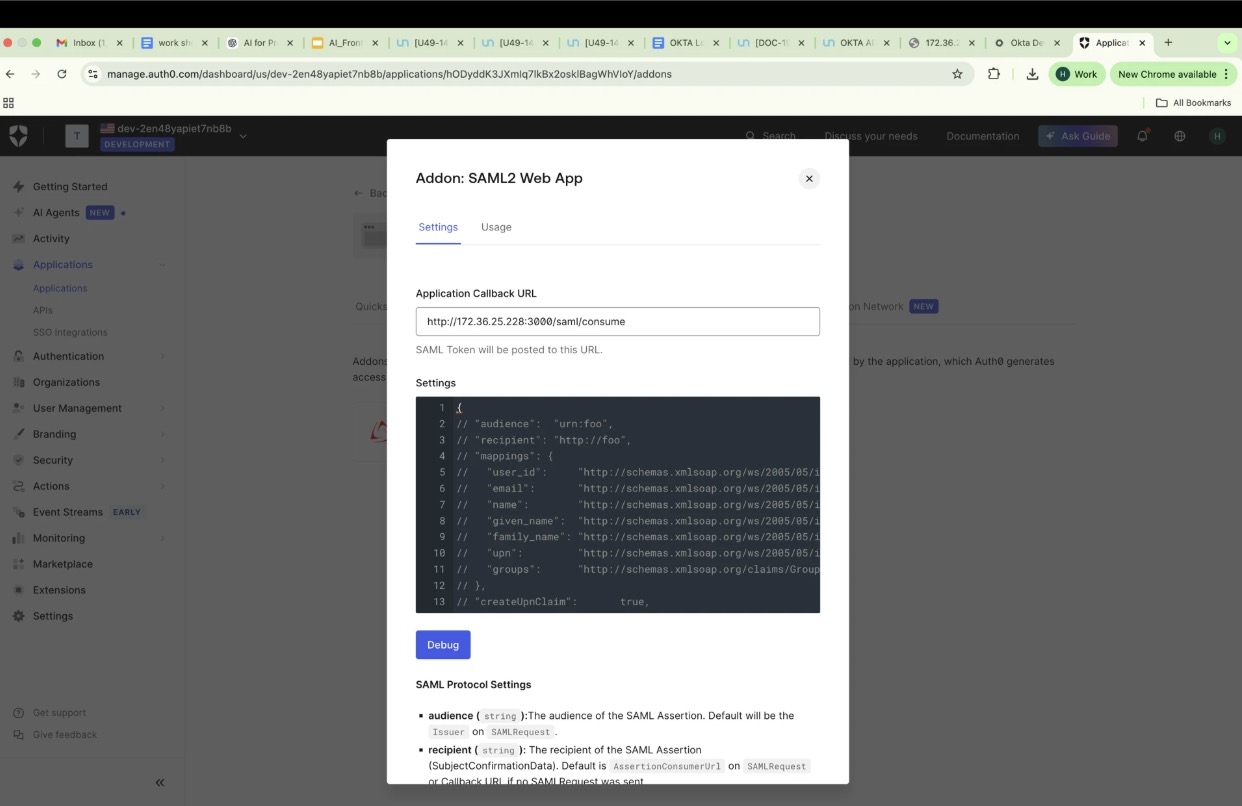
Select SAML2 Web App > Settings.
Enter your application callback endpoint.
Optionally modify the JSON configuration to map attributes. If you do not modify this, you can mention the property value in saml.json for mapping.
{ "mappings": { "user_id": "http://schemas.xmlsoap.org/ws/2005/05/identity/claims/nameidentifier", "email": "http://schemas.xmlsoap.org/ws/2005/05/identity/claims/emailaddress", "name": "http://schemas.xmlsoap.org/ws/2005/05/identity/claims/name" }}
Step 5: Obtain SAML configuration details
In the Usage tab, note these details for your Okta integration:
Issuer (Entity ID)
Identity Provider Login URL
Identity Provider Certificate
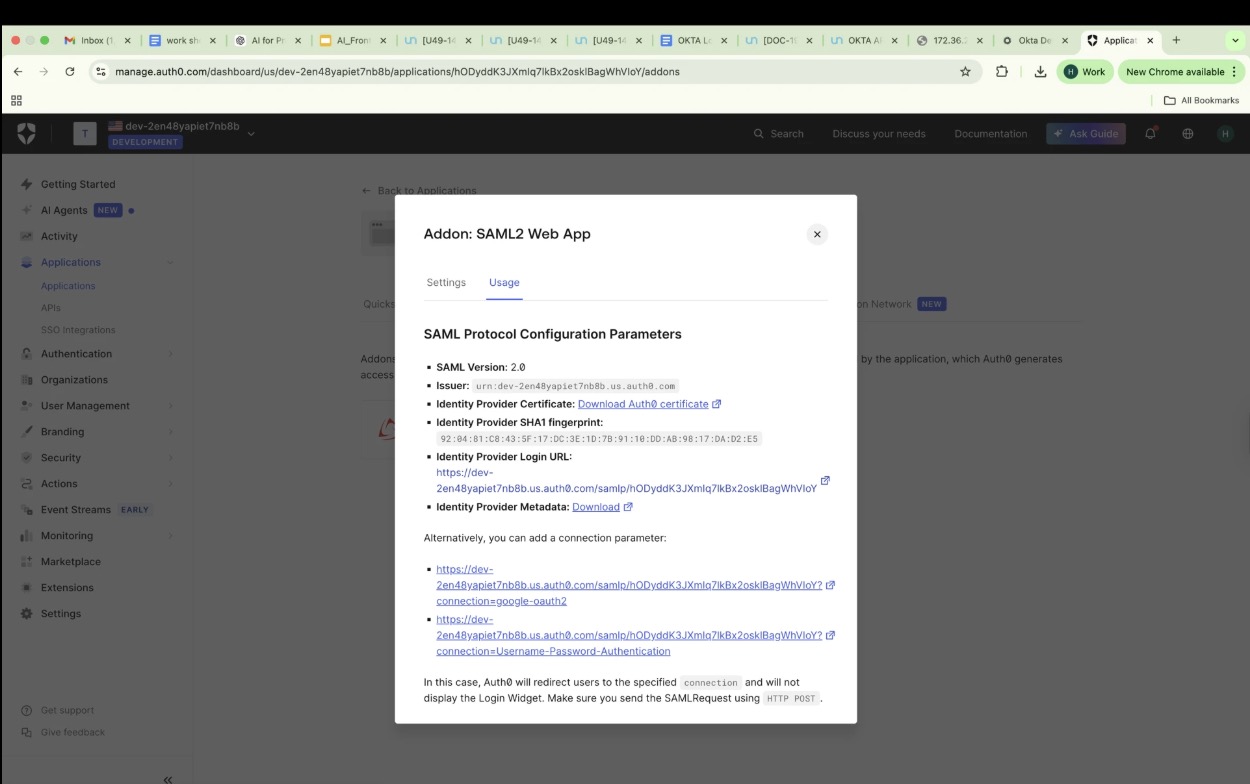
Test the integration
Go to your application login page.
Trigger SSO. The page should redirect to Auth0 Okta for authentication.
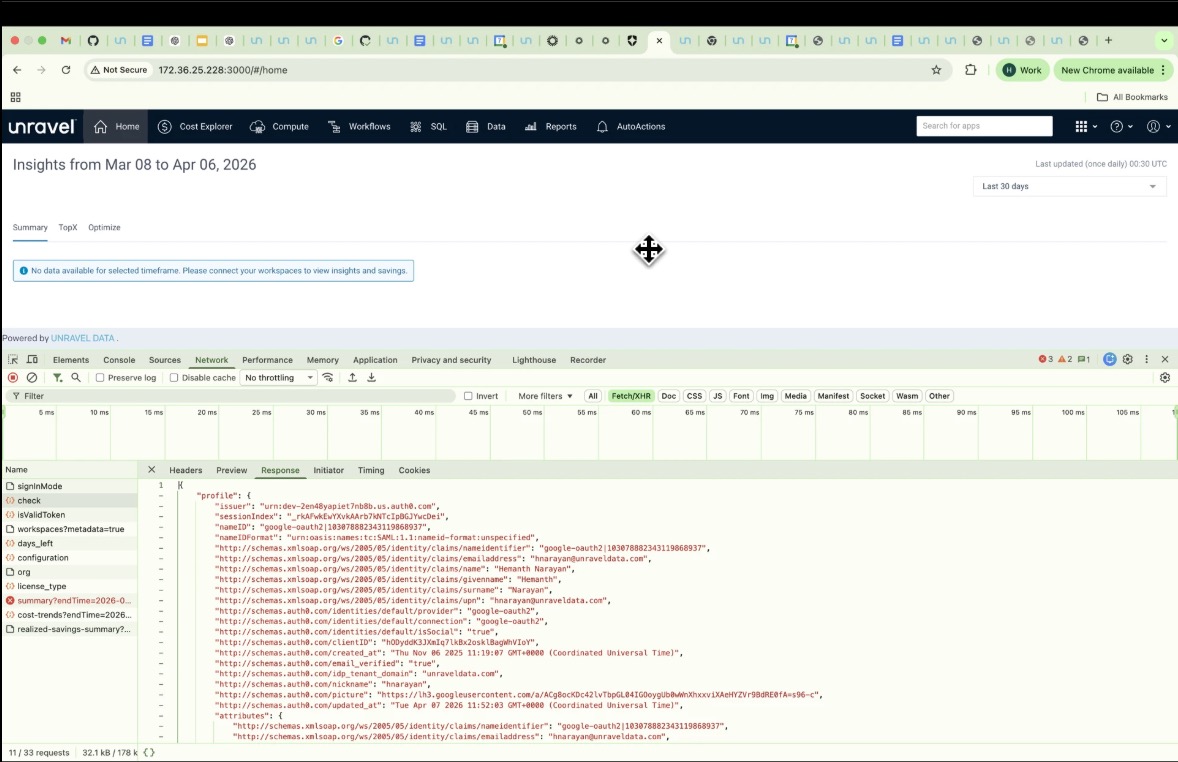
After you sign in, Auth0 posts a SAML response to your /saml/consume endpoint.
Verify that user attributes, such as email and name, are correct in the SAML assertion.
Troubleshooting
Empty SAML response: Verify that your callback URL exactly matches your Auth0 settings.
Invalid signature: Download and use the updated Identity Provider (IdP) certificate.
SAML configuration example
The following JSON structure shows a complete configuration for an Auth0-based SAML integration. It includes the required entryPoint, identity provider certificate, and specific attribute mappings for username and groups.
{"entryPoint": "https://dev-2en48yapiet7nb8b.us.auth0.com/samlp/hODyddK3JXmIq7lkBx2osklBagWhVIoY","issuer": "urn:dev-2en48yapiet7nb8b.us.auth0.com","cert": "-----BEGIN CERTIFICATE-----\nMIIDHTCCAgWgAwIBAgIJ4NDdaFw0zOTA2MzAwMjA4NDdaMCwxKjAoBgNVBAMTIWRldi0yZW40OHlhcGll\ndDduYjhiLnVzLmF1dGgwLmNvbTCCASIwDQYJKoZIhvcNAQEBBQADggEPADCCAQoC\nggEBALUPjxLg62HYMZklLBowv7t9HS4JNBt7tPcVzfFg57yvnOrccpbbUhGdKuKi\nTn/XqqOG5vHmMwXXiP64qYL0da/SaszMLRunfeDuruVbrPECUzy+IpuKji3nVXVS\nxdyidSuR3o7zSXDk29D4+W+2bsTb5gXqJD8pN+BWUYWMbN9SEJMFEug53/ummUXc\nrTmZWaGRPuq/LlbRw1goCvhHEYNQts4WkQR8PSIeSNoF+VhvE2HAYV9ByHFu69N9\nlepO5gVAkrDNp7JT8rQQrYypL4iUBIb11ZpGqLOUpeG4w/6wbaqyEe+HedcXyhnz\nFnKzU9JE84y2q+tI/gXSgyh1Ro8CAwEAAaNCMEAwDwYDVR0TAQH/BAUwAwEB/zAd\nBgNVHQ4EFgQUfh7bqxiBIFuy/ui9QUBIUTt2q3gwDgYDVR0PAQH/BAQDAgKEMA0G\nCSqGSIb3DQEBCwUAA4IBAQA/RbM4JQcysulD3WVAi9XvBgO6JGCKcqYRDHbwfLF+\nsmNjbFkqyIfDkfD6dIGgqJDcrFJrQ/e+L3XaIHxj1OC1em6gaSlrhOYzXIwzk1OA\nCDx/wugxlTNyct8XPVGCzl4+8CiKiPYPIPIJqPG4/NJmi3/p9kTCbLYpfkS6IbCh\nL1cXoABT9W6oTcY/Qp0HQ8ZIVNICJQe0SNWtPtfVXi198OsWFUiSxO8K7sBB9yjg\n45nuYsobsjPJuXEtEmSKcqClAIYeraHlNR6PeMe4cg5facIJOxtg3PcD4G+5VJY9\nZwg6RgrFoJL4acu9/yv9C/nA5s/JckeZH/zPbLr9NMR9\n-----END CERTIFICATE-----","callbackUrl": "http://18.235.125.178:3000/saml/consume","unravel_mapping": {"username": "http://schemas.xmlsoap.org/ws/2005/05/identity/claims/emailaddress","groups": "http://schemas.xmlsoap.org/claims/Group"},"logoutEnabled": true,"logoutUrl": "https://dev-2en48yapiet7nb8b.us.auth0.com/v2/logout?client_id=hODyddK3JXmIq7lkBx2osklBagWhVIoY&returnTo=http://18.235.125.178:3000/login"}Configuration parameters
The following table describes the key fields used in the SAML configuration.
Key | Description |
|---|---|
entryPoint | The Identity Provider (IdP) SSO URL. When a user selects Login, the application redirects to this URL to start the SAML flow. |
issuer | The unique identifier for your Service Provider (SP). It is typically your Auth0 tenant URN and is used by the IdP to verify the request source. |
cert | The X.509 certificate used by Auth0 to sign SAML responses. Your application uses this to verify authenticity and prevent tampering. |
callbackUrl | The Assertion Consumer Service (ACS) endpoint (for example, /saml/consume). After login, the IdP posts the SAML response to this URL. |
unravel_mapping | Defines how SAML attributes map to internal fields, such as mapping the email claim to a username. |
logoutEnabled | Enables Single Logout (SLO) support to trigger logout from both the application and the IdP. |
logoutUrl | The URL the application redirects to for IdP logout. |
Manage logout behavior
The requirements for logoutUrl depend on your environment.
When logoutUrl is required
In a developer account, such as your dev-2en48yapiet7nb8b.us.auth0.com tenant, Auth0 does not automatically manage session termination between the application and the Identity Provider (IdP).
Because the Auth0 session cookie remains valid after you sign out of your application, Auth0 may silently sign the user back in during the next login attempt if the IdP session was not cleared.
To properly clear the session, you must manually call the Auth0 logout endpoint. This requires a corresponding code change in your application to point to the following URL:
https://dev-2en48yapiet7nb8b.us.auth0.com/v2/logout?client_id=<CLIENT_ID>&returnTo=http://yourapp/login
This configuration ensures that:
The Auth0 session is invalidated.
The user is redirected back to the application Login page.
When it is not required
In enterprise or production federations between Okta and Auth0, the logout behavior is typically managed automatically through Single Logout (SLO). This process uses standard SAML <LogoutRequest> and <LogoutResponse> flows.
In this scenario, the Identity Provider (IdP), such as Okta or Auth0, notifies the Service Provider (SP) to end its session simultaneously.
Because of this automatic coordination, you do not need to explicitly call the /v2/logout endpoint from your application. However, if SLO is not configured or supported—which is common in developer or non-enterprise environments—you can use the logoutUrl to explicitly clear the IdP session.
Text Diagram: Okta Login Flow